学习记录
最好的学习方式不如看文档:https://zh-hans.react.dev/learn/passing-props-to-a-component
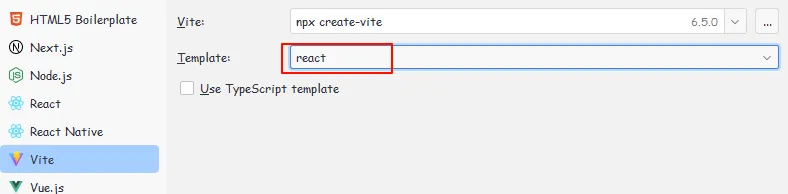
创建 react 项目
使用的 webtorm => File => new project
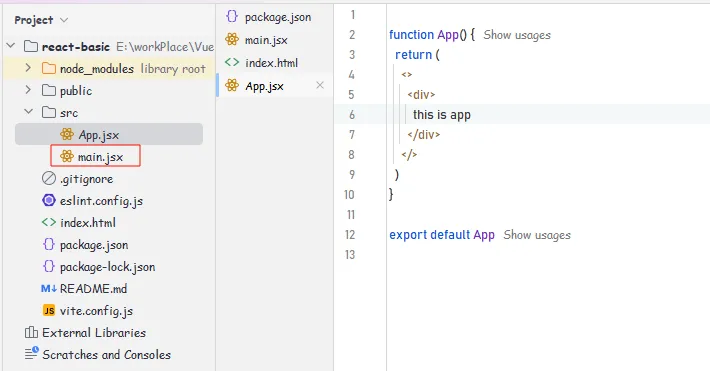
| main.js/index.js | 整个项目的程序入口, 从这里开始运行 |
| import { createRoot } from ‘react-dom/client’ | 核心包 |
| import App from ’./App.jsx’ | 导入项目的根组件 |
| createRoot(document.getElementById(‘root’)).render( | 把 APP 根组件渲染到 id 为 root (index.html)的 dom 节点上 |
什么是 JSX
概念:JSX 是 javascript 和 xml (html) 的缩写,表示在 JS 代码中编写HTML 模板结构,它是 React中编写UI模板的方式
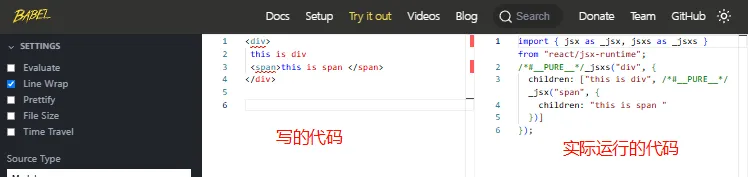
JSX并不是标准的JS语法,它是 JS 语法的扩展,浏览器本身不能识别,需要通过 解析工具做解析之后才能在浏览器中运行.
function App() {
  return (
    <>
      <div>
        this is app
      </div>
    </>
  )
}
1.HTML的声明式模板写法。2.可以使用JS变量
在线网站:https://babeljs.io/
识别js表达式
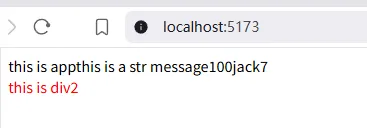
JSX 中可以通过 大括号语法 {} 识别 JavaScript 中的表达式,比如常见的变量、函数调用、方法调用等
- 使用引号传递字符串
- 使用 JavaScript 变量
- 函数调用和方法调用
- 使用 JavaScript 对象
// 项目的根组件
// APP -> index.js / main.jsx  -> index.html#root

const count = 100

function getName(){
    return 'jack'
}

function App() {
    return (
        <>
            <div>
                this is app
                {/* 引号传递*/}
                {'this is a  str message'}

                {/*{js变量}*/}
                {count}

                {/*{函数调用、方法调用}*/}
                {getName()}
                { new Date().getDate() }

                {/*{ js 对象}*/}
                {/*  {{}} --- 外层是识别表达式的语法,内层是识别对象结构 */}
                <div style={{color: 'red'}}>this is div2</div>

            </div>
        </>
    )
}
注意:if 语句、switch语句、变量声明属于语句,不是表达式,不能出现在 {} 中.
JSX 列表渲染
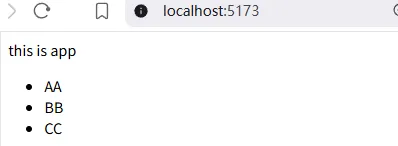
语法:在 JSX 中可以使用原生 JS 中的 map 方法遍历渲染列表
const list = [
    {id: 1001, name: 'AA'},
    {id: 1002, name: 'BB'},
    {id: 1003, name: 'CC'},
]

function App() {
    return (
        <>
            <div>
                this is app
                <ul>
                    {/*
                    报错 `react-dom_client.js?v=812ad7f6:17515 Each child in a list should have a unique "key" prop.`
                    --- 给 li 加上 key(唯一的) 即可
                    -- key 的作用: React 框架内部使用 -- 提升更新性能的...
                    */}
                    {list.map(item => <li key={item.id}>{item.name}</li>)}
                </ul>
            </div>
        </>
    )
}
JSX 条件渲染
语法:在 React 中,可以通过逻辑与运算符 &&、三元表达式 (?:) 做条件渲染
const isLogin = true

function App() {
    return (
        <>
            <div>
                this is app

                {isLogin && <span>this is span </span>}
                {isLogin ? <span>Success Login</span> : <span>Loading ..... </span>}
            </div>
        </>
    )
}
JSX 复杂条件渲染

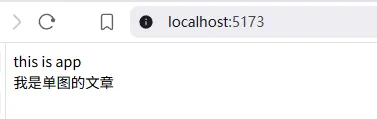
需求:列表中需要根据文章状态适配三种情况,单图,三图,无图 三种模式
解决方案:自定义函数 + if 判断语句
// 文章类型
const type = 1 // 0 1 3

function getContent() {
    if (type === 0) {
        return <div>我是无图的文章</div>
    } else if (type === 1) {
        return <div>我是单图的文章</div>
    } else {
        return <div>我是三图的文章</div>
    }
}

function App() {
    return (
        <>
            <div>
                this is app

                {getContent()}
            </div>
        </>
    )
}